AI FOR PROPERTY LENDING
An AI underwriting agent for bridging and development finance
Ask Eben to research a borrower, examine deal documents and prepare a credit-paper draft with source references. Your team reviews the evidence and makes the lending decision.
What does an AI underwriting agent do in Eben?
Eben uses research tools and document retrieval to help an underwriter investigate a deal. It can look up available company and property evidence, find relevant passages in selected documents and bring the results into a sourced answer or report draft.
That means you can ask a lending question across the evidence, then follow the references to inspect the records and passages used. The agent supports research, comparison and drafting. Credit judgement, approval and conditions remain with your team.
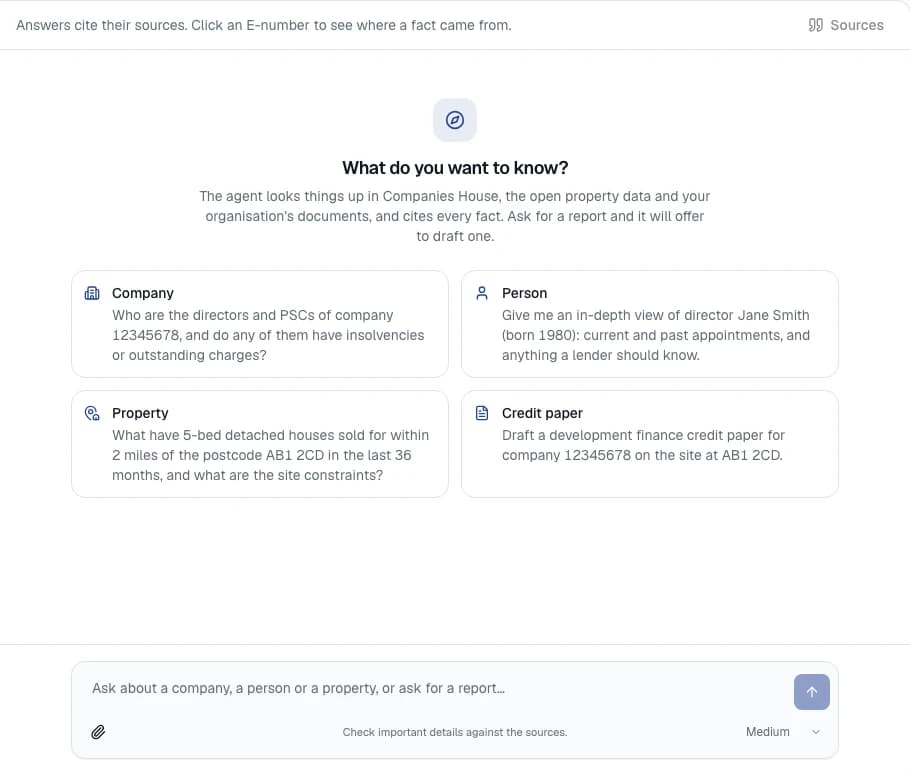
From a lending question to a reviewable answer
1. Give the agent the deal context
Start with a company name or number, a property location or a specific question. Add supported deal documents when needed, such as the proposal, valuation or appraisal. Keep the brief and files in a project so the research has a clear context.
2. Research across records and documents
Ask about directors, connected companies, registered charges or the available property evidence. The agent can retrieve relevant document passages and compare them with its research. Ask it to distinguish applicant statements from evidence and identify gaps or inconsistencies for review.
3. Check sources and save useful findings
Open the cited evidence, confirm that it supports the claim and record any correction or follow-up question. Save reviewed findings to the deal for colleagues. A citation is a route to verification; it does not guarantee that the answer is complete or correct.
4. Prepare the credit-paper draft
Bring selected documents and research into your team’s reviewed report format. Edit sections, resolve outstanding questions and export to Word for further review. Explore the credit-paper preparation workflow.
A bridging-finance question to try
Compare the borrower’s proposal with the available company records and the uploaded valuation. Summarise the borrower structure, identify conflicting information and list the evidence we still need to assess the proposed exit. Cite the sources and separate applicant claims from checked facts.
A useful answer should make the borrower structure easier to inspect, connect statements to evidence and make unresolved questions explicit. Your underwriter checks the reasoning and decides what further work is required.
Our worked credit-paper example shows source excerpts, calculations and a reviewer correction. It is a fictional teaching example, not a customer case or an unedited agent output.
Questions about AI underwriting support
Does Eben approve or decline loans automatically?
No. Eben supports UK property-lending teams with research and draft content. It does not provide an autonomous credit decision, guarantee compliance or replace your lender’s approval process.
What makes it different from a general AI chat?
Eben connects the conversation to company and property research tools, selected deal documents and a shared project workspace. Your team can inspect source references, retain reviewed findings and use configured report templates within that workflow.
Can it read all of a borrower’s documents?
It supports PDFs, Word documents, spreadsheets, emails and text files. Extraction quality depends on the file; processing notes identify partial or unreadable content. Review those notes and original documents when a conclusion depends on a figure, table or passage.
What happens to confidential information?
Organisation access controls protect files and reports. Relevant content may be processed by external AI providers. Review our security and document-handling information and agree your requirements before uploading confidential material.
Does it have complete, current information on every borrower and property?
No. Public records can lag events, source availability varies and planning coverage is partial. Read the data coverage details, check source dates and resolve missing evidence through your normal underwriting process.