AI underwriting support for UK bridging and development lenders.
Research borrowers, review deal documents and prepare credit papers with an AI agent that connects company records, property evidence and your source documents.
Research with evidence. Lending decisions with your team.
CONNECTED EVIDENCE01 — 03
THE BORROWER01
Beyond the company name.
Directors & connected companies
Charges, filings & history
Companies House evidence
THE PROPERTY02
Comparables · Market context · Site evidence
YOUR RESEARCH, CONNECTED03
Ask the next question. Follow the answer to its source.
Company recordsProperty dataYour files
Evidence you can open. Gaps you can see.Illustration
PUBLIC RECORDS. CONNECTED CONTEXT.
Companies HouseHM Land RegistryEPC recordsONS & UK HPIPlanning sources
WHAT POWERS EBEN
The data. The research tools. The work to keep them running.
Use an established research system, with its data ingestion, document processing and ongoing maintenance already in place.
Our own Companies House mirror
We operate and maintain a Companies House database, with streaming updates for supported changes. Investigate relationships across companies, directors, appointments and registered charges.
Connected research across the register
Maintained property datasets
Sold transactions, EPC records, market trends and available planning evidence are collected and brought into the same workflow. Source dates and coverage limits help you judge what each result tells you.
Property context alongside company evidence
Your documents, ready for research
Build a searchable library for your organisation. Eben retrieves relevant document passages and uses company and property tools to investigate questions and draft reports with supporting sources.
Document retrieval + AI research + source references
PUT THEM TO WORK TOGETHER
“Read this borrower’s proposal, investigate the directors and connected companies, review the available property evidence, and draft a research brief highlighting what needs checking.”
Your deal documentsCompany & property toolsA draft with sources & gaps
Companies House changes are ingested from supported streams; property sources follow their own publication cycles. Planning coverage is partial. AI research needs review. See data and coverage
THE PLATFORM
Connected research. A more complete picture.
Explore the tools your team will use. Company, property and Agent screens below are captured from the working platform.
UNDERSTAND WHO YOU’RE LENDING TO
Look beyond a single company.
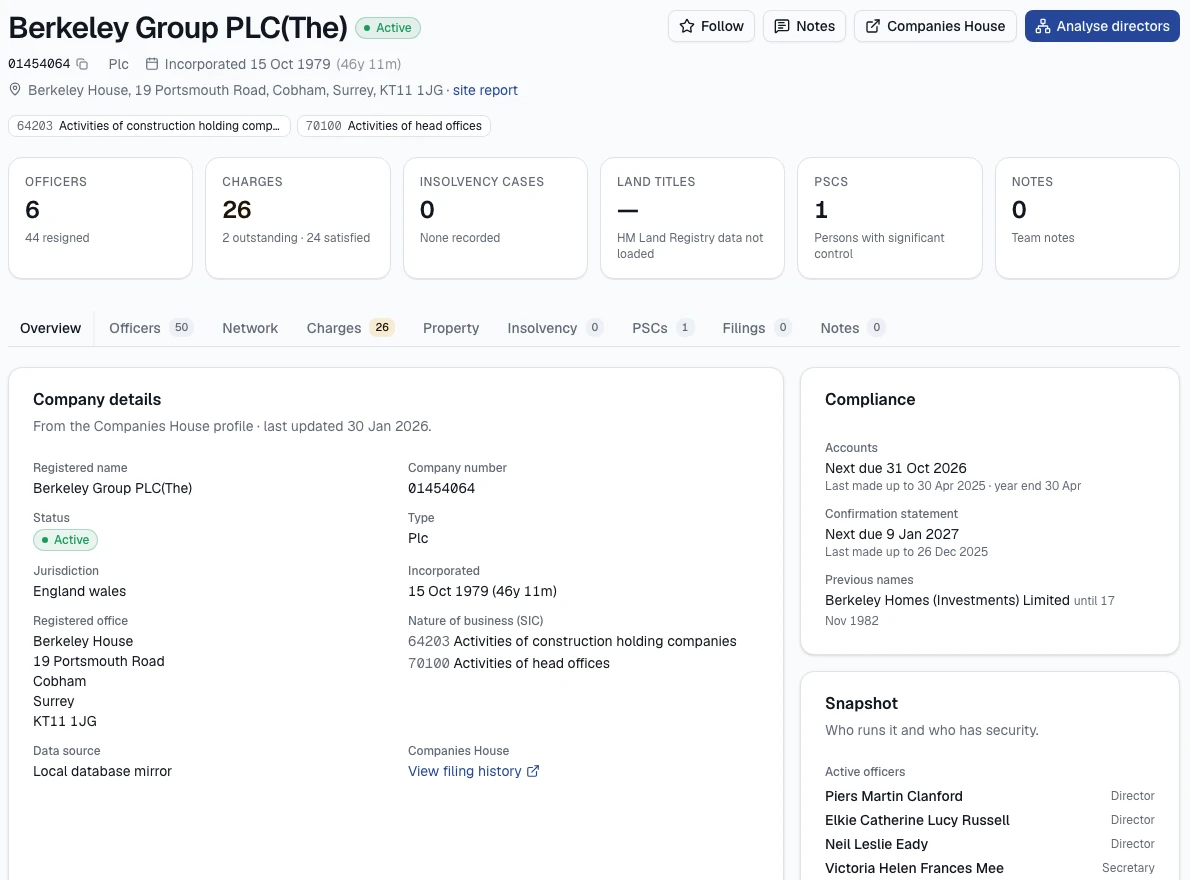
Follow directors across appointments, inspect registered charges and explore company connections. Put dated insolvency and charge events in context before drawing conclusions.
Companies, directors, PSCs and registered charges
Interactive networks and lender comparisons
Dated findings with links to the underlying records
Company research using public Companies House records. Shown as a product example, with no affiliation or endorsement implied. Screens are cropped to exclude account details and private work.View full size (new tab)
PUT THE PROPERTY IN CONTEXT
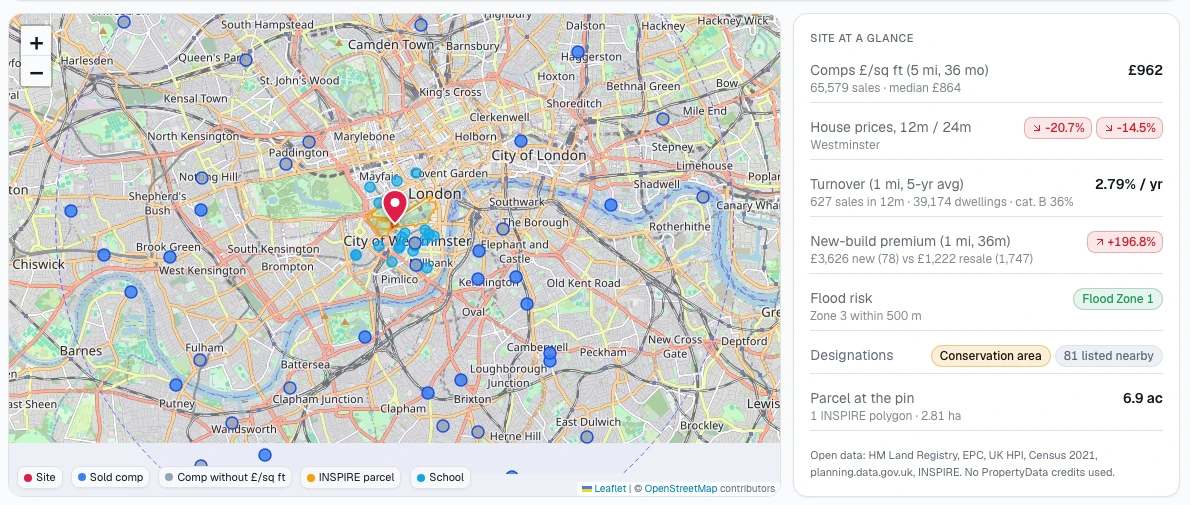
A clearer picture of the site.
Bring sold prices, EPC floor areas, local market trends and available planning evidence into one site report. Explore comparables and see the limits of the evidence.
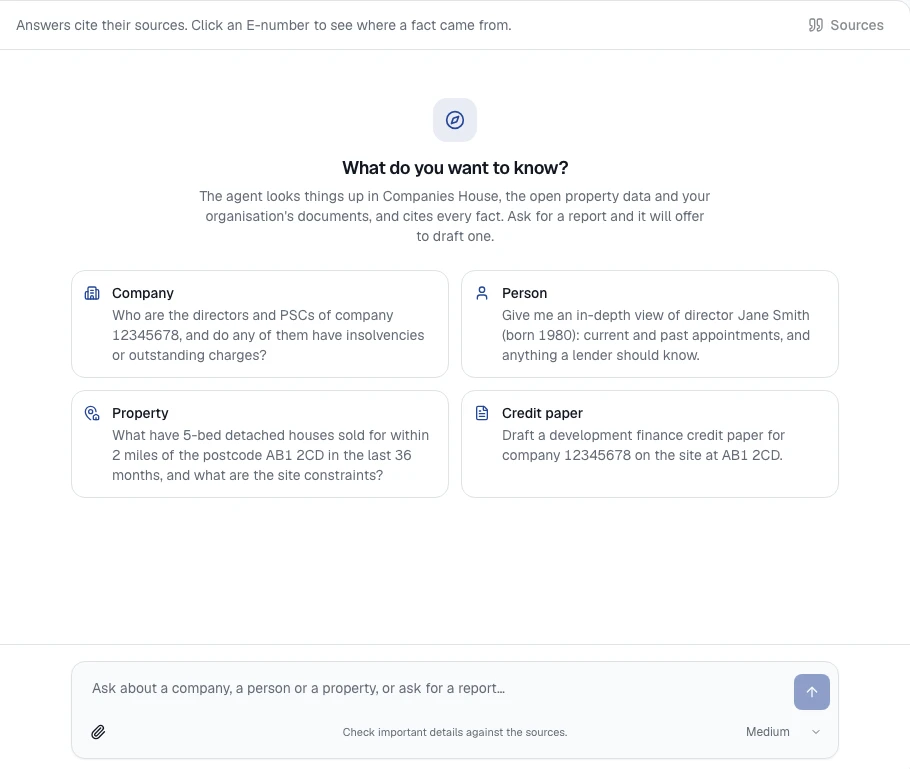
Ask questions in plain English across company and property data. Attach deal documents to give Eben the context that matters, then open the sources behind its answer.
The actual Agent workspace, ready for a question or document attachment. This is the starting screen, not a generated answer. Screens are cropped to exclude account details and private work.View full size (new tab)
MAKE YOUR DOCUMENTS USEFUL
Less searching. More understanding.
Bring PDFs, Word files, spreadsheets, emails and text into your organisation’s shared library. Find relevant passages and return to the original file when you need to check a detail.
Development appraisal.xlsxSpreadsheet · original retained
Site information.pdfPDF · searchable passages
Borrower background.docxWord · shared with your organisation
Selected files become citable context for your questions.
FROM RESEARCH TO A REVIEWABLE DRAFT
Start with evidence, not a blank page.
Draft company, person, property and credit reports. Create your own report types from example documents, review sections and export to Word. Check reviewed spreadsheet figures with deterministic calculations.
Editable sections, source references and visible gaps
Eben operates its own Companies House database mirror, with streaming ingestion for supported changes. This supports research across companies, directors, appointments and charges. The platform connects that research with maintained property datasets, your organisation’s documents, monitoring and AI-assisted reports. Source publication delays and coverage limits still apply.
How does the AI use our documents?
Supported files are processed and indexed in your organisation’s library. Retrieval-augmented generation (RAG) lets the AI find relevant passages in the selected documents and use them alongside its company and property research tools. Answers can cite the retrieved evidence for your team to check. This is document retrieval, not training a new model on your files.
Who is Eben for?
Eben is built for UK development-finance, bridging and specialist property-lending teams. It helps people researching borrowers, assessing sites, preparing credit papers and monitoring companies. We can demonstrate it against the work your team actually does.
How do I get an account?
Book a demo with your company name, work email and a little about your team. We’ll contact you to arrange a walkthrough. If you decide to proceed, we’ll agree access before sending an invitation to set a password. Approved organisation administrators can invite colleagues. There is no automatic subscription or card payment.
How much does it cost?
We’ll discuss pricing with you based on your team, usage and support requirements. Hosting, routine maintenance and an agreed AI allowance can be included in your plan. Bespoke development and additional paid data are agreed separately.
Does it work with our own documents?
Yes. You can attach supported PDFs, Word documents, spreadsheets, emails and text files to your questions or reports, and keep originals in a shared organisation library. Extraction notes identify limitations such as unreadable content or spreadsheet formula values that need checking.
Can we use our own report format?
Yes. Organisation administrators can upload one to three example documents to propose a report template, then review and edit it. Generated reports can be edited section by section and exported to Word. Only upload examples you have permission to use.
Is all UK planning and property data included?
Coverage depends on the dataset and location. Sold-price and EPC sources have geographic and publication limits; planning coverage is partial. Eben shows source dates and gaps where available. A missing planning result does not mean permission is absent. See Data & coverage for the details.
Does Eben make lending decisions?
No. It supports research and review. AI answers and report drafts need checking against their sources; indicative property figures are not formal valuations. Eben does not currently replace credit-bureau searches, identity and sanctions checks, legal due diligence or a loan-servicing system.
Can we see it on one of our own cases?
Yes. Get in touch and we’ll agree a suitable case for a demonstration. We can start with public company and property information, then discuss any private documents and your data-handling requirements before you share them.
LET’S LOOK AT A REAL CASE
Bring a question. See what Eben can find.
Tell us about your team and the work you want to make easier. We’ll walk through the platform and discuss access that fits.